|
Basic Buy and Add To Cart Links Using
Order-Link
Buy One Product and Go Directly To
Payment Form
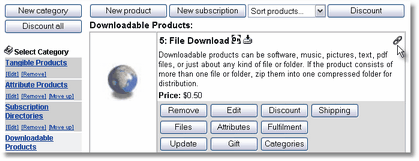
Open the AShop Deluxe administration panel and navigate
to the product. Click on the chain link icon at the
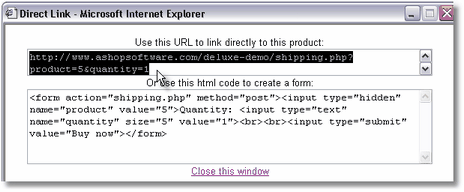
top right side of the product listing and copy the Order-Link
code from the top of the small window (not the form
code).
In this live example, there is a payment
option page and then a payment form. When there is only
one payment option set up for the shopping cart, the
payment option page is skipped and this link clears
previous cart contents and goes directly to the payment
form with the one product in the cart.
http://www.ashopsoftware.com/shipping.php?product=41&quantity=1
Add More Than One Product
To The Cart
Add Product and Go To Check Out
To add a product without clearing previously added products,
add the "&add=1" parameter to the URL.
http://www.ashopsoftware.com/shipping.php?product=41&quantity=1&add=1
Add Product and Go To View Cart
To open the View Cart page instead of Check Out, change
"shipping.php" to "basket.php".
http://www.ashopsoftware.com/basket.php?product=41&quantity=1&add=1
Return To Last Page Viewed or Return To Catalog?
If you add returntoshop=true to the link or as a hidden field in a form, the Continue Shopping and Empty Cart buttons will return visitors to catalogue.php instead of the last page viewed.
http://www.ashopsoftware.com/basket.php?product=41&quantity=1&add=1&returntoshop=true
See also:
Order-Link Basics | Order-Link
Help Topic
Basic Buy and Add To
Cart Links Using Order-Link
Add Buy buttons, View Cart
and Check Out links into an existing web page using Order-Link.
Order-Link Buy Button
With Customer Input Field
Select From Attribute
Alternatives Using Order-Link
|



