Catalog pages are dynamically generated by index.php or catalogue.php for customers to make selections, and purchase products. Shopping pages may also be created by inserting Buy buttons in HTML or PHP web pages using the Order-Link method. In any case, the behavior of the shopping cart when products are added to the cart will be determined by the Shopping Cart Catalog Mode setting, which is in Configuration > Shop Parameters.
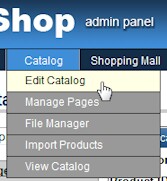
To manage the catalog, open the Administration Panel and select Edit Catalog on the Catalog menu.
Before adding products to the catalog, set the thumbnail image size in Layout.
Product images are automatically resized when uploaded through the Files menu. Resizing is done using ImageMagick or GD software, depending on which software is installed on the server. If the thumbnail image size is later changed, all of the previously uploaded images must be resized again.
Add at least one category, then add products.