Shopping Cart Software - Home
Shopping Cart Software Sales-Order Management Affiliate Referral Tracking Digital Product Delivery
 
AShop Deluxe Tour


Sales Taxes

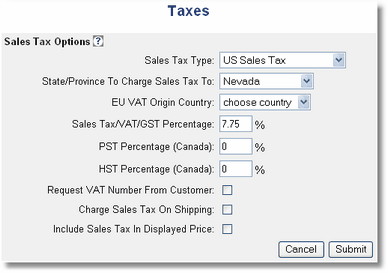
Sales tax for United States, Canada, and Euro Union are supported. Sale tax rules are set in the admin panel under Store Configuration > Taxes.

Each product may be set as taxable.
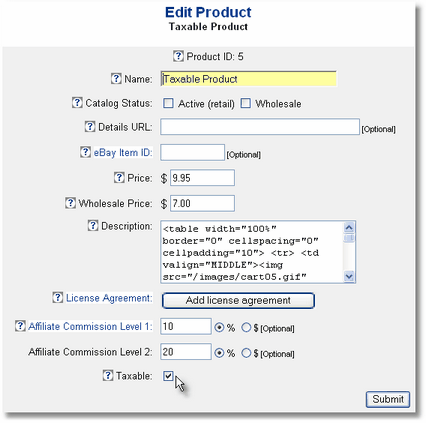
edit product - taxable or not

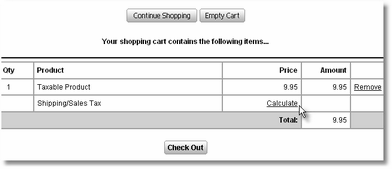
When there is at least one taxable or shippable product in the shopping cart, the shopper is asked for the product destination country, state (or province), and zip (or postal code) in order to calculate tax and shipping amounts.

The shopper clicks on the Calculate link in the View Cart page... view cart - tax information requested
...and enters the destination for sales tax calculations.
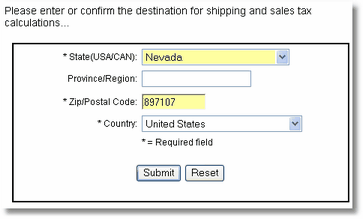
shipping-tax-information-requested
Then, the sales tax is displayed in the View Cart page.
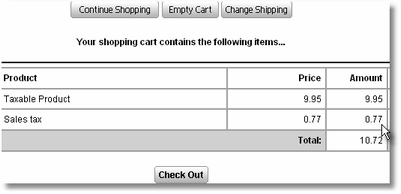
sales tax displayed in basket.php

Sales Tax Help Topic


View Cart Check Out
AShop Deluxe
Automated Online Order and Payment Processing System.
Select topic.Shopping Cart Tour
Select topic.Frequently Asked Questions

eMerchant
Multi-user Sales System
Automated Shopping Cart
PLUS Backend Sales Office
with: Order Entry - Invoicing Vendors - Purchase Orders
Order Tracking - Vendor Bills
Select topic.eMerchant Tour

Digital Mall
Members join and contribute downloadable products, then earn commissions from sales. Options for individual shops or one main shop where customers select and order member products.
Select topic.Digital Mall Tour

Clients & Partners
Select topic.Clients
Select topic.Affiliates
Select topic.Resellers

Downloads and Services
Select topic.File Downloads & Trials
Select topic.Software Installation
Select topic.Request Tech Support
Select topic.Buy Products & Services

Company
Select topic.About Us
Select topic.Contact Us

Resources
Select topic.Web Hosting Service
Select topic.Payment Services
Select topic.eCommerce Tools
AShop Internet © copyright 2002 - 2008