This shopping cart software is certified by PayPal.
How to set up PayPal Express Checkout and Web Site Payments Pro
1. Request API Credentials from PayPal
Website Payments Pro service must be activated in your PayPal Business account.
An application through paypal.com is required and fees must be paid before Website Payments Pro or Express Checkout will work in the shopping cart. To use the Payment Pro options you will need a certificate file, a Merchant ID, and a password.
Login to your PayPal account and go to the Website Payments Pro section.
| A. | Login to your PayPal Pro enabled PayPal account and click Profile. |
| B. | Click "API Access" under the section "Account Information". |
| C. | Click "Request API credentials" (or "View API credentials" if you have done this before) in the box "Option 2". |
| D. | Click "Request API signature" and click "Agree and Submit". |
| E. | The API Username on the following page should be entered into the box labeled "Merchant ID" in your AShop payment option, the API Password should be entered in the box labeled "Security Secret", the Signature should be entered into the box labeled "Transaction Key" and your PayPal ID (the email you use to login to PayPal) should be entered into the box "PayPal ID". |
3. Setup PayPal Website Payments Pro in AShop
| A. | Login to your AShop V administration panel and click Configuration->Payment. |
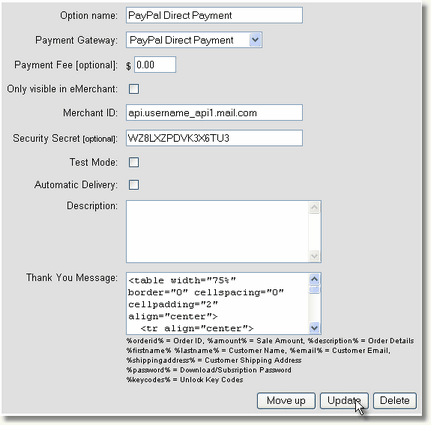
| B. | Select PayPal Direct Payment and click Add. |

| C. | Enter the PayPal API Username into the box labeled "Merchant ID", the PayPal API Password into the box labeled "Security Secret" and the PayPal Signature into the box labeled "Transaction Key". Then click the Update button. |
3. Setup PayPal Express Checkout in AShop
| A. | Login to your AShop V administration panel and click Configuration->Payment. |
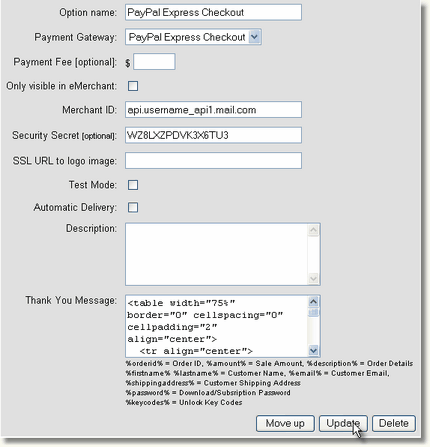
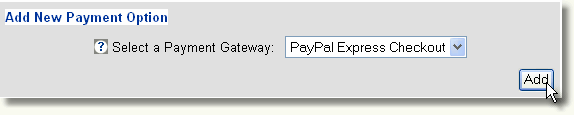
| B. | Select PayPal Express Payment and click Add. |
| C. | Enter the PayPal API Username into the box labeled "Merchant ID", the PayPal API Password into the box labeled "Security Secret", the PayPal Signature into the box labeled "Transaction Key" and your PayPal ID in the box labeled "PayPal ID". Then click the Update button. |