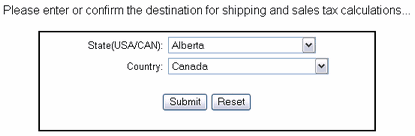
Customers are asked to provide destination or shipping information if it is required for the products that have been selected.
The shipping information form shows fields selectively. If there are no taxable or shippable products in the basket, the shipping information form page does not appear. The customer is directed to the basket and there is not an option to enter shipping information.
If there is at least one taxable or shippable product in the basket, The View Cart page will include an additional row for Shipping/Sales Tax with a link to the shipping information form.
If there are taxable products, but no shippable products in the basket, the shipping information page asks only for the country and state in order to determine if sales tax is required and to apply the correct rate for the locality.
If there is at least one shippable product in the basket, the shipping information page asks for the ship to name and complete shipping address.
Note: The shipping information is saved for each customer. See Customer Profile
Related Topics
Each product is set as taxable in the Add Product or Edit Product page.
Shipping is set for each product by clicking the Shipping button in the Edit Catalogue view.
Per order handling charges or shipping options will only be added to orders that have at least one shippable product in the basket. To charge handling without adding shipping per product, set Flat Rate shipping for each product and set the value to .0001